> ## Documentation Index
> Fetch the complete documentation index at: https://docs.re-factor.ai/llms.txt
> Use this file to discover all available pages before exploring further.
# Resources
> Data that power your AI-driven processes
## Motivation
Resources are any piece of unstructured or structured data your AI-driven processes will utilize. This can include documents of any type, webpages, emails, and more. Within re-factor, we provide simple solutions for storing and embedding resources into your LLM workflows so that you can derive the most value for your business processes.
## Structure
### Example Resource
```json theme={null}
{
"id": "123e4567-e89b-12d3-a456-426614174000",
"account_id": "shared",
"name": "quarterly_report.pdf",
"directory_path": "/projects/abc/reports",
"mime_type": "application/pdf",
"sha256": "e3b0c44298fc1c149afbf4c8996fb92427ae41e4649b934ca495991b7852b855",
"original_uri": "https://example.com/reports/quarterly_report.pdf",
"external_id": "123456789",
"external_storage_type": null,
"storage_bucket": "my-bucket",
"storage_key": "projects/abc/reports/quarterly_report.pdf",
"size_bytes": 123456,
"tags": ["report", "quarterly", "finance"],
"metadata": {
"author": "Finance Team",
"quarter": "Q4 2024"
},
"created_by": "user-123",
"created_at": "2023-08-25T10:00:00Z",
"updated_at": "2023-08-25T10:00:00Z"
}
```
### Fields
Unique identifier for the resource (generated by re-factor)
ID of the account that owns this resource
Name of the resource, e.g. `"quarterly_report.pdf"`
Path to the directory containing the resource, e.g. `/projects/abc/reports`
MIME type of the resource, e.g. `"application/pdf"`
SHA256 hash of the resource content. Set by re-factor when creating a resource.
Original URI of the resource, if applicable.
External identifier for the resource, if applicable.
Type of external storage, if applicable.
Storage bucket where the resource is stored.
Key for artifact storage in the storage system
Size of the resource in bytes. Set by re-factor when creating a resource.
List of tags associated with the resource
Additional metadata associated with the resource
ID of the user who created the resource
Timestamp when the resource was created. Set by re-factor when creating a resource.
Timestamp when the resource was last updated
### Types
#### ResourcePlaceholder
A placeholder within a [Runnable](/guides/runnables) that represents a resource that will be embedded into the runnable at runtime.
Name of the resource, e.g. `screenshot` or `report`. This must be unique within the runnable as it will be used to reference the resource via template variables (e.g. `{{screenshot}}`)
Description of the resource, e.g. `A screenshot of the dashboard`
Type of the resource.
List of valid MIME types that can be embedded into the resource placeholder, e.g. `image/png` or `application/pdf`. Wildcards are supported, e.g. `image/*`.
Whether the resource is required or optional
JSON schema for validating the metadata of the resource. This should be `null` if no metadata is required. Must be a [JSON Schema Draft 7](http://json-schema.org/draft-07/schema#) compliant object.
#### EmbeddedResource
Resources can be embedded into runnables which declare [`ResourcePlaceholder`](#resourceplaceholder)s via the `EmbeddedResource` interface which consists of the following fields:
The name that the resource will be referenced by within the runnable.
The resource that will be embedded into the runnable. This can be a string representing an existing resource's `id` or an instance of a \[Resource] object.
## Features
### Storage
Create and manage resources programmatically:
```typescript example.ts theme={null}
import { Resource } from '@re-factor/sdk';
// Create a resource from a local file path
const pdfResource = await Resource.fromPath('./document.pdf', {
directory: '/projects/abc/reports',
mime_type: 'application/pdf',
metadata: {
author: 'Finance Team',
quarter: 'Q4 2024'
}
}, { store: true });
// Create a resource from a URL
const webResource = await Resource.fromUrl('https://example.com/data.png', {
mime_type: 'image/png',
name: 'image_data.png',
}, { store: true });
// Create a resource from text
const textResource = await Resource.fromText({
content: 'Important business metrics...',
name: 'metrics_summary',
tags: ['business_intelligence'],
metadata: {
source: 'database'
}
}, { store: true });
```
```python example.py theme={null}
from refactor.resources import Resource
# Create a resource from a local file path
pdf_resource = Resource.from_path(
path='./document.pdf',
settings=dict(
directory='/projects/abc/reports',
mime_type='application/pdf',
metadata={
'author': 'Finance Team',
'quarter': 'Q4 2024'
}
),
store=True
)
# Create a resource from a URL
web_resource = Resource.from_url(
url='https://example.com/data.png',
settings=dict(
mime_type='image/png',
name='image_data.png',
),
store=True
)
# Create a resource from text
text_resource = Resource.from_text(
content='Important business metrics...',
settings=dict(
name='metrics_summary',
tags=['business_intelligence'],
metadata={
'source': 'database'
}
),
store=True
)
```
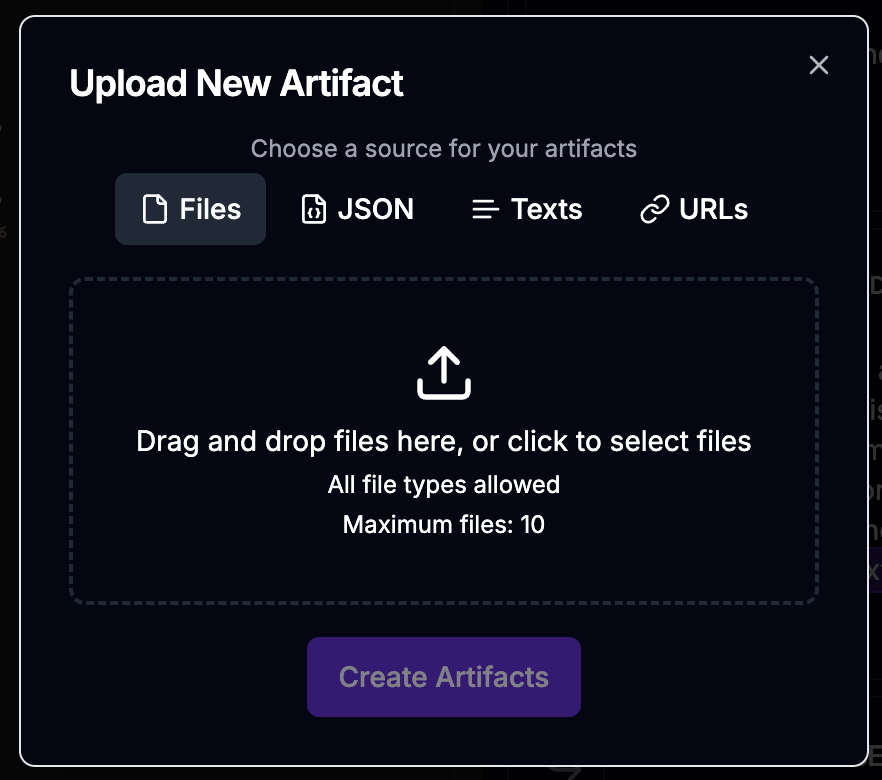
Or, use the UI to create and manage resources:
 ### Transformations
Resources can be transformed and processed in various ways:
```typescript theme={null}
// Convert PDF to text
const textContent = await pdfResource.transform({
type: 'text',
});
// Extract images from a document
const images = await pdfResource.transform({
type: 'images'
});
// Extract text from an image via OCR
const ocr = await imageResource.transform({
type: 'ocr',
provider: 'google'
});
```
While our library provides a wide range of built-in transformations, you can also easily create your own using plugins.
### Embedding within Runnables
Resources can be seamlessly integrated into prompts, flows, and agents:
```typescript example.ts theme={null}
import { CompletionRunnable } from '@re-factor/sdk/runnable';
import { Resource } from '@re-factor/sdk/resources';
const document = await Resource.fromPath('./document.pdf', {
directory: '/projects/abc/reports',
mime_type: 'application/pdf',
metadata: {
author: 'Finance Team',
quarter: 'Q4 2024'
}
}, { store: true });
const runnable = await CompletionRunnable.construct({
name: 'document_analyzer',
resources: [{
name: 'document',
description: 'The document to analyze',
type: 'file',
mime_types: ['application/pdf'],
required: true
}],
prompt: {
system: "You are a finance expert",
messages: [{
role: 'user',
content: `Provide a thorough analysis of the following document, placing emphasis on
the financial metrics.
{{ document }}
`
}, {
role: 'assistant',
generate: true
}]
}
});
const result = await runable.run({
resources: [document.embedAs('document')]
});
```
```python example.py theme={null}
from refactor.runnable import CompletionRunnable
from refactor.prompt import CompletionPrompt, UserMessage, AssistantMessage
from refactor.resources import Resource, ResourceSettings
document = Resource.from_path(
path="./document.pdf",
settings=ResourceSettings(
directory="/projects/abc/reports",
mime_type="application/pdf",
metadata={
"author": "Finance Team",
"quarter": "Q4 2024"
}
),
store=True
);
runnable = CompletionRunnable.construct(
prompt=CompletionPrompt(
system="You are a document analyzer",
messages=[
UserMessage(content="""Provide a thorough analysis of the following document,
focusing on the financial metrics."""),
AssistantMessage(generate=True, set_output="analysis")
]
),
)
result = runnable.run(
resources=[document.embed_as("document")]
)
```
## Best Practices
When working with resources in re-factor:
1. Use meaningful names, directory paths, and tags for efficient organization
2. Clean up unused resources to save space
## Resource Types
re-factor supports various resource types out of the box:
* Documents (PDF, Word, Excel, etc.)
* Images (PNG, JPEG, etc.)
* Audio files (MP3, WAV, etc.)
* Video files (MP4, etc.)
* Webpages
* Structured data (JSON, CSV, etc.)
* Custom resource types via plugins
For detailed implementation guidance and advanced features, refer to our [SDK documentation](/sdk).
### Transformations
Resources can be transformed and processed in various ways:
```typescript theme={null}
// Convert PDF to text
const textContent = await pdfResource.transform({
type: 'text',
});
// Extract images from a document
const images = await pdfResource.transform({
type: 'images'
});
// Extract text from an image via OCR
const ocr = await imageResource.transform({
type: 'ocr',
provider: 'google'
});
```
While our library provides a wide range of built-in transformations, you can also easily create your own using plugins.
### Embedding within Runnables
Resources can be seamlessly integrated into prompts, flows, and agents:
```typescript example.ts theme={null}
import { CompletionRunnable } from '@re-factor/sdk/runnable';
import { Resource } from '@re-factor/sdk/resources';
const document = await Resource.fromPath('./document.pdf', {
directory: '/projects/abc/reports',
mime_type: 'application/pdf',
metadata: {
author: 'Finance Team',
quarter: 'Q4 2024'
}
}, { store: true });
const runnable = await CompletionRunnable.construct({
name: 'document_analyzer',
resources: [{
name: 'document',
description: 'The document to analyze',
type: 'file',
mime_types: ['application/pdf'],
required: true
}],
prompt: {
system: "You are a finance expert",
messages: [{
role: 'user',
content: `Provide a thorough analysis of the following document, placing emphasis on
the financial metrics.
{{ document }}
`
}, {
role: 'assistant',
generate: true
}]
}
});
const result = await runable.run({
resources: [document.embedAs('document')]
});
```
```python example.py theme={null}
from refactor.runnable import CompletionRunnable
from refactor.prompt import CompletionPrompt, UserMessage, AssistantMessage
from refactor.resources import Resource, ResourceSettings
document = Resource.from_path(
path="./document.pdf",
settings=ResourceSettings(
directory="/projects/abc/reports",
mime_type="application/pdf",
metadata={
"author": "Finance Team",
"quarter": "Q4 2024"
}
),
store=True
);
runnable = CompletionRunnable.construct(
prompt=CompletionPrompt(
system="You are a document analyzer",
messages=[
UserMessage(content="""Provide a thorough analysis of the following document,
focusing on the financial metrics."""),
AssistantMessage(generate=True, set_output="analysis")
]
),
)
result = runnable.run(
resources=[document.embed_as("document")]
)
```
## Best Practices
When working with resources in re-factor:
1. Use meaningful names, directory paths, and tags for efficient organization
2. Clean up unused resources to save space
## Resource Types
re-factor supports various resource types out of the box:
* Documents (PDF, Word, Excel, etc.)
* Images (PNG, JPEG, etc.)
* Audio files (MP3, WAV, etc.)
* Video files (MP4, etc.)
* Webpages
* Structured data (JSON, CSV, etc.)
* Custom resource types via plugins
For detailed implementation guidance and advanced features, refer to our [SDK documentation](/sdk).